
Forms
Now you can have your own form added into the CRM. This is great news for sales people who want to record the details of a site survey or scope of a job. If you already use a paper form ask us about adding this into the CRM
Once a form has been completed in the CRM you can edit it, send it by email or view and download it as a PDF for printing. The completed form can be presented as a certificate or present it in any other format ready to present it to your customer
Forms can be set to be available in jobs as well as opportunities / estimates. When a form is completed in an opportunity and the opportunity is later converted to a job the form will be transferred to the job ready for an engineer or technician to see the scope of the job
We have plumbing and gas forms already available that can be used to complete gas inspections and produce certificates
Forms set up
1. Click on forms (in Admin system) and click on Add a Form Name
2. Give the form a name
3. Select the form form the dropdown list
4. If you already use serial number add the next number here (or just start at a random number)
5. If you have an industry registration number for your business, add it here
6. Show form select either show in jobs / show in opportunity or both
7. Save
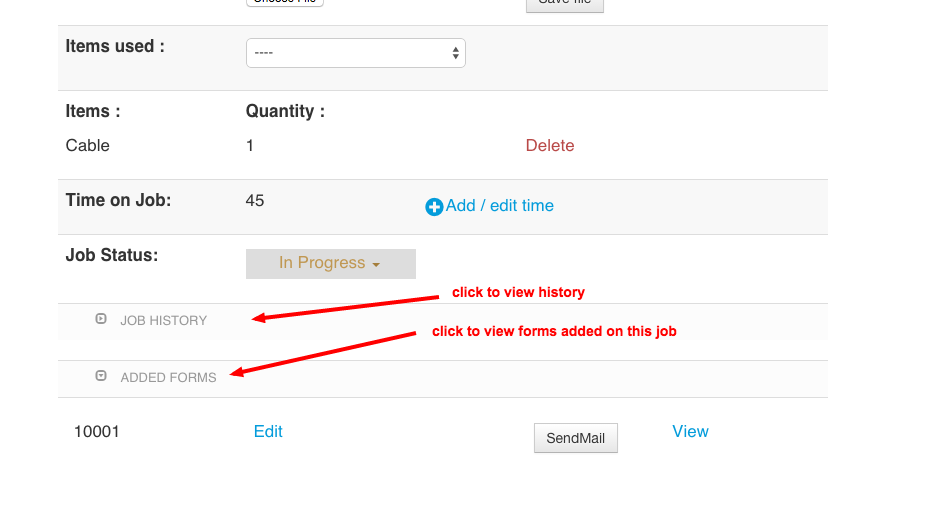
example form/s added in a job sheet:
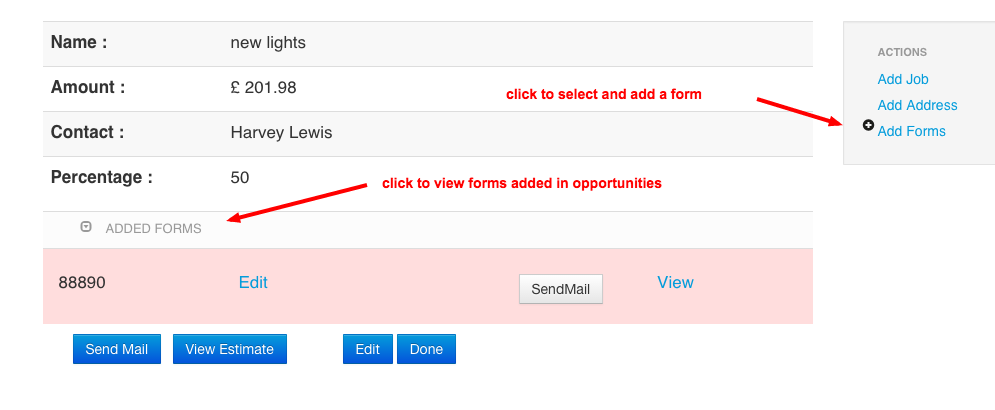
example added form/s in an opportunity:
Comments